How to Test a Used Phone Before Buying Online (2026): Free Phone Test + Live Remote Inspection
Buying a used iPhone or Android phone on Facebook Marketplace, eBay, Swappa, OfferUp or Craigslist? Photos, videos and even a FaceTime call can be faked. This guide shows how to test a used phone before you buy: the free MxMob phone test when you can hold it, and Live Remote Inspection, a new way to watch the seller’s phone get tested live from anywhere in the US before you pay.
The short answer
- Ask for the IMEI and run it through the free CTIA Stolen Phone Checker (see our IMEI check guide).
- Confirm there is no iCloud Activation Lock or Google account lock and no carrier lock.
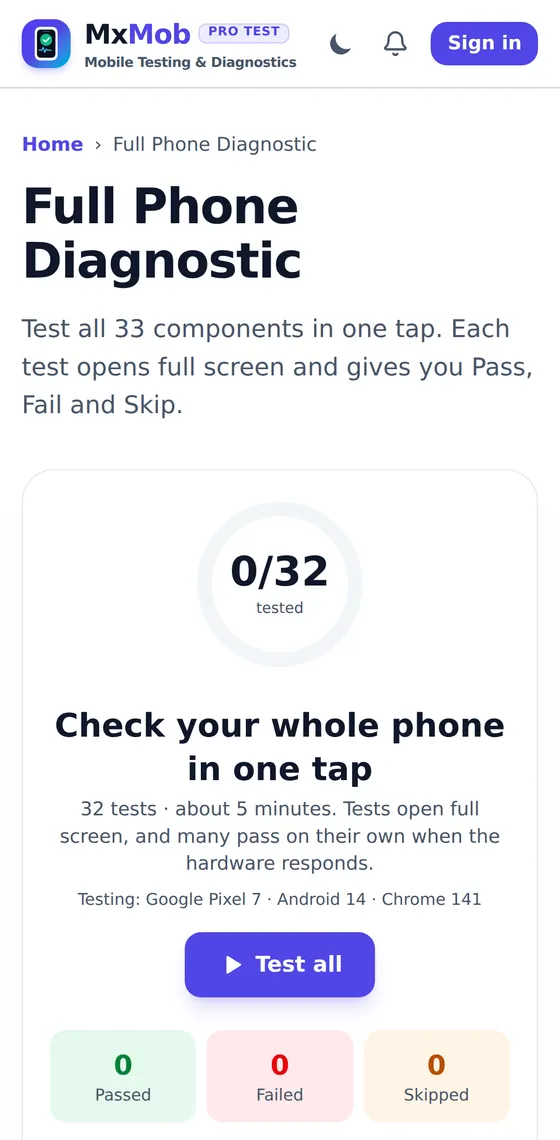
- Meeting in person? Open mxmob.com/check on the phone and run the free 33-point phone test: screen, touch, speakers, mic, cameras, sensors, buttons and more.
- Buying online or shipped? Start a Live Remote Inspection: the seller opens one link on the phone and you watch every test, plus anti-scam checks they can’t fake, from your own screen.
- Pay through the platform’s checkout, a credit card or PayPal Goods and Services, never Zelle, Cash App or gift cards.
- When it arrives, run the handover check and the phone test again before you confirm delivery.
What is MxMob?
MxMob (mxmob.com) is a free, browser-based phone test and phone diagnostic site. You open a page on the phone, tablet or laptop you want to check and it tests the hardware right in Safari, Chrome, Samsung Internet, Edge or Firefox. There is no app to download, only a free account for the tools and nothing to install on a phone you don’t own yet, which is exactly the situation when you buy a used phone.
People usually find MxMob by searching things like “phone test”, “test my phone online”, “phone diagnostic test free”, “how to check a used phone before buying” or “dead pixel test”. Here is what you can do on the site:
- Full 33-point phone diagnostic: one tap runs the screen, touch, multi-touch, speakers, earpiece, microphone, front and rear cameras, flashlight, motion sensors, compass, GPS, Wi-Fi, buttons, vibration, fingerprint and face unlock and more, then gives you a pass/fail report.
- Single tests for when one part is acting up: dead pixel test, OLED burn-in test, touch screen test, ghost touch test, speaker test and water eject, microphone test, camera test, battery test, phone benchmark and dozens more.
- Laptop diagnostic test for Windows laptops, MacBooks and Chromebooks: keyboard, trackpad, webcam, speakers, display and ports.
- Test report links that sellers can send to buyers, which buyers can check on the verify report page.
- Live Remote Inspection, the newest feature: a buyer watches a seller’s phone or laptop being tested live, from anywhere, before paying for it. More on that below, because it solves the biggest problem with buying a used phone online.
Why buying a used phone online goes wrong
A used iPhone or Galaxy can save you hundreds of dollars, which is why so many people in the US buy them from Facebook Marketplace, eBay, Swappa, OfferUp, Mercari, Craigslist and Reddit. The same savings attract scammers. These are the problems that come up again and again:
- Blacklisted or financed phones. A phone reported lost or stolen, or one whose installment plan stopped being paid, can be blocked by US carriers. It may work for a few weeks and then stop connecting. A free IMEI check catches most of these.
- Activation Lock and Google account locks. An iPhone still signed in to the previous owner’s Apple ID, or an Android phone with Factory Reset Protection, is close to worthless once it is reset. The used iPhone guide shows the checks.
- Hidden hardware faults. Dead touch zones, a crackly earpiece, a microphone that cuts out, Face ID that no longer works, a camera that won’t focus, OLED burn-in. None of these show up in listing photos.
- Fake and clone phones. Clones can show “iPhone 16 Pro” or “Galaxy S25 Ultra” in Settings but can’t fake the graphics chip or real screen resolution. See how to tell an original phone from a fake.
- Bait and switch. The seller shows you a good phone, then ships a worse one of the same model. This is the hardest scam to prove after the fact.
- Payment scams. Requests to pay by Zelle, Cash App, Venmo “friends”, wire transfer or gift cards, and the “send me the code I just texted you” Google Voice scam.
Most guides stop at “meet in a public place and test the phone.” That is good advice when you can. The problem is the large share of deals where you can’t: the seller is in another city or state, the listing is shipping-only, or you are buying for someone far away. That gap is what Live Remote Inspection was built for.
How to test a used phone in person (10 minutes)
If you can meet the seller, work through these steps before any money changes hands. Everything below is free, and the full list with region-specific advice is in the used phone checklist.
- Check the IMEI. Dial *#06#. The number should match the SIM tray and the box. Enter it into the CTIA Stolen Phone Checker (stolenphonechecker.org), the free US database run by the wireless industry. Our IMEI stolen phone check guide explains what a clean result does and doesn’t prove.
- Check account locks. On iPhone, the seller should sign out of their Apple ID and turn off Find My; the surest test is an erase in front of you, after which the phone should reach the Hello screen and set up without asking for their Apple ID. On Android, they should remove their Google account before the reset.
- Check the carrier lock. On iPhone, go to Settings → General → About → Carrier Lock; you want “No SIM restrictions.” On Android, try your own SIM. The SIM card test walks you through it.
- Check battery health. iPhone: Settings → Battery → Battery Health. Samsung: Samsung Members diagnostics. Pixel: Settings → Battery → Battery health. Under 80% means a replacement soon; see the battery health guide.
- Run the free phone test. Open mxmob.com/check in the phone’s browser and tap Test all. It checks the screen for dead pixels, every touch zone, multi-touch, speakers, the earpiece, the microphone, the cameras, the flashlight, motion sensors, GPS, buttons, vibration, fingerprint and face unlock and more.
- Check it’s genuine. Run the benchmark: it names the graphics chip. An “iPhone” that reports a Mali or Adreno GPU is a clone. On iPhone, also look at Settings → General → About → Parts and Service History for replaced screens and batteries.
- Look it over. Gaps around the screen, a lifted back (a swollen battery), corrosion in the charging port, fog under a camera lens.
On a Samsung phone you can also try the built-in test menu with *#0*# (blocked on many US carrier models); the Samsung diagnostics guide covers it. iPhone and Pixel equivalents are in the iPhone and Pixel guides.
Buying online or shipped: why photos, videos and FaceTime aren’t enough
When the phone is in another state, the usual advice is to “ask for more photos” or “ask for a video call.” Each of those has a hole a scammer can drive through:
| Method | Proves it’s this phone, right now? | Hardware actually tested? | Hard to fake? | Record for a dispute? |
|---|---|---|---|---|
| Listing photos | No (can be stolen from another listing) | No | No | Weak |
| Pre-recorded video | No (could be any phone, any day) | Only what they choose to show | No | Weak |
| FaceTime / video call | Partly | You see the screen, but nothing is measured | Medium: dead zones, a bad mic or earpiece are easy to hide | None, unless you record it |
| Screenshot of a test app | No | Yes, on some phone | No (screenshots are easy to edit) | Weak |
| MxMob report link | Shows the last 4 IMEI digits to match later | Yes, labelled measured or marked by seller | Medium (run before you asked) | Yes, 30 days |
| MxMob Live Remote Inspection | Yes: live checks created the moment you send them | Yes: 30+ tests, streamed to you live | High: mirror code, speaker code, tap-the-squares | Yes: signed, timestamped, 90 days, plus handover check |
New: MxMob Live Remote Inspection (mxmob.com/inspect)
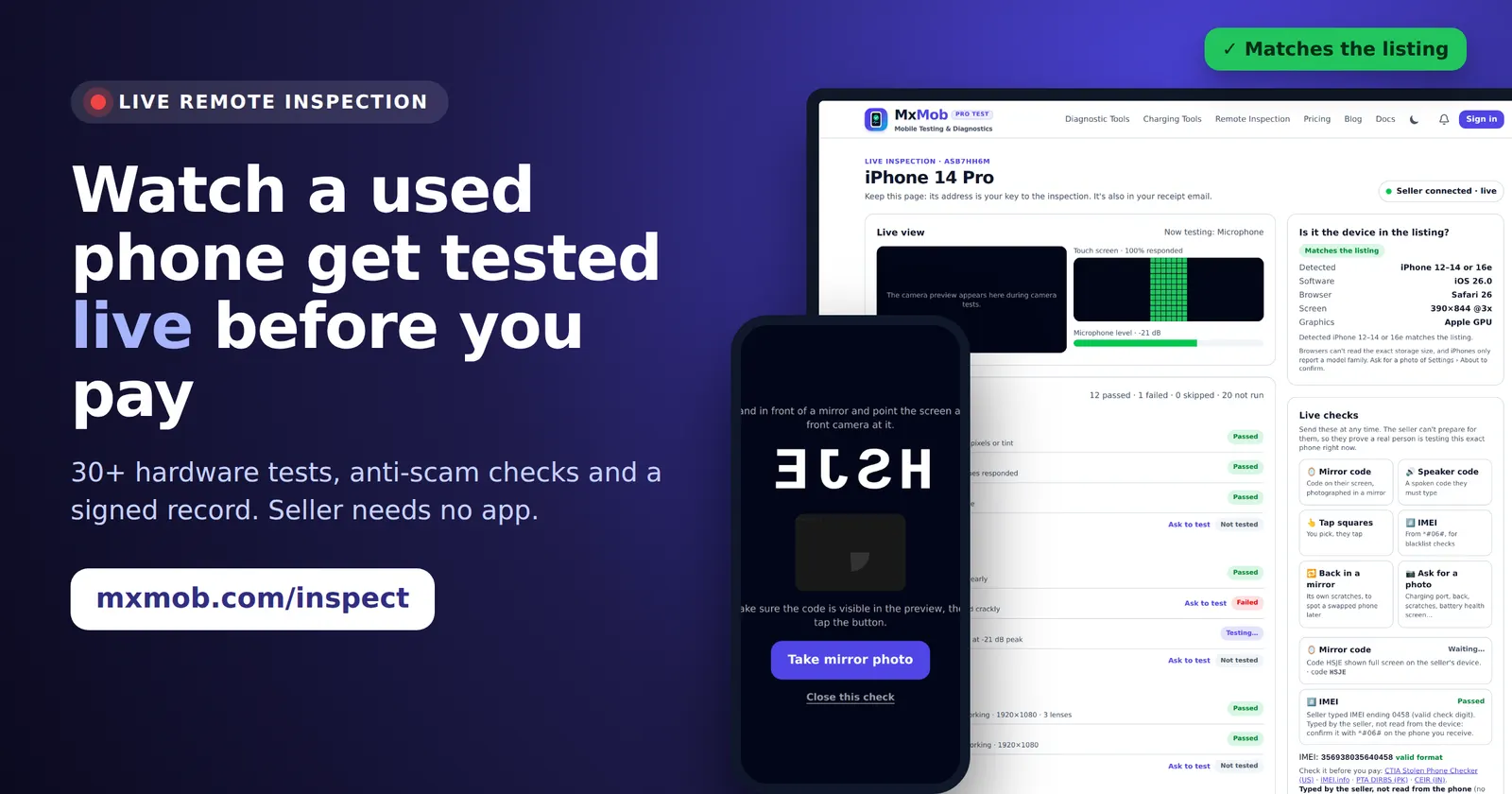
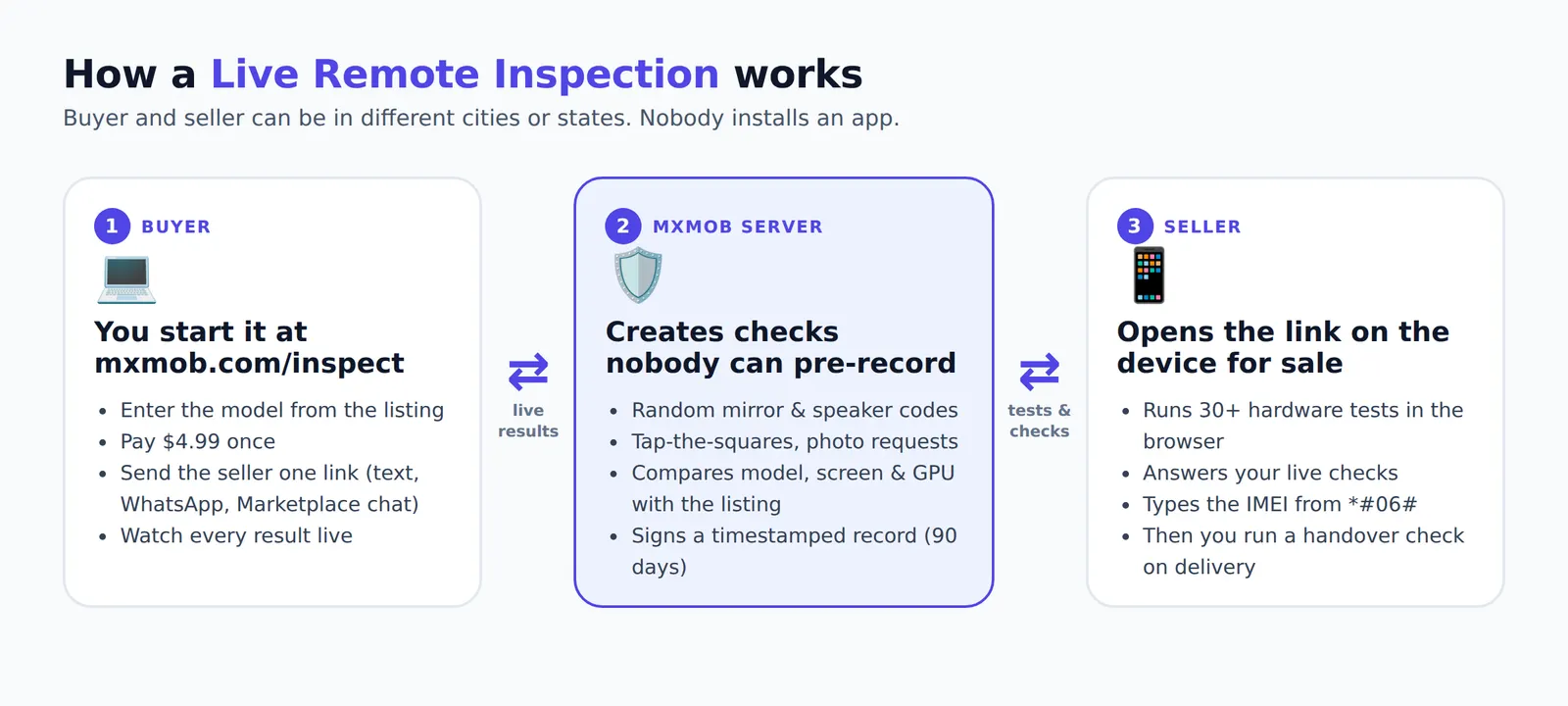
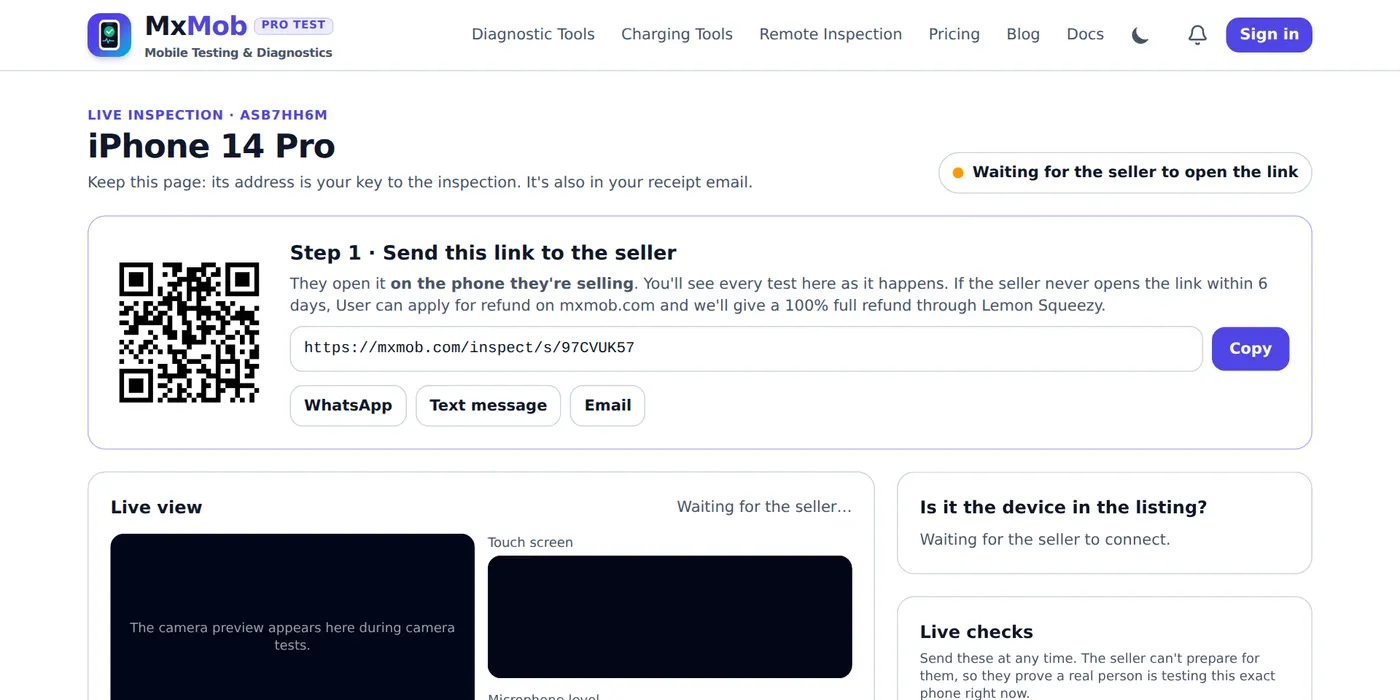
Live Remote Inspection lets you inspect a used phone or laptop remotely, live, before you buy it. You send the seller one link. They open it on the phone they are selling and run MxMob’s tests, and every result appears on your screen as it happens: the touch map filling in, the microphone level moving, each camera opening, each pass and fail. While it runs, you send live checks the seller can’t prepare for, so you know a real person is testing that exact phone, right now.
Most people haven’t heard of anything like it, because as far as we know nothing like it existed before. Phone diagnostic apps test the phone in your hand. Video calls show you a phone but measure nothing. Remote inspection services send a person, which costs far more and takes days. Live Remote Inspection is self-serve software that runs in two browsers: yours and the seller’s. It costs $4.99 once per device, with no subscription and no app for either of you.
Step 1: Start the inspection and send the seller one link
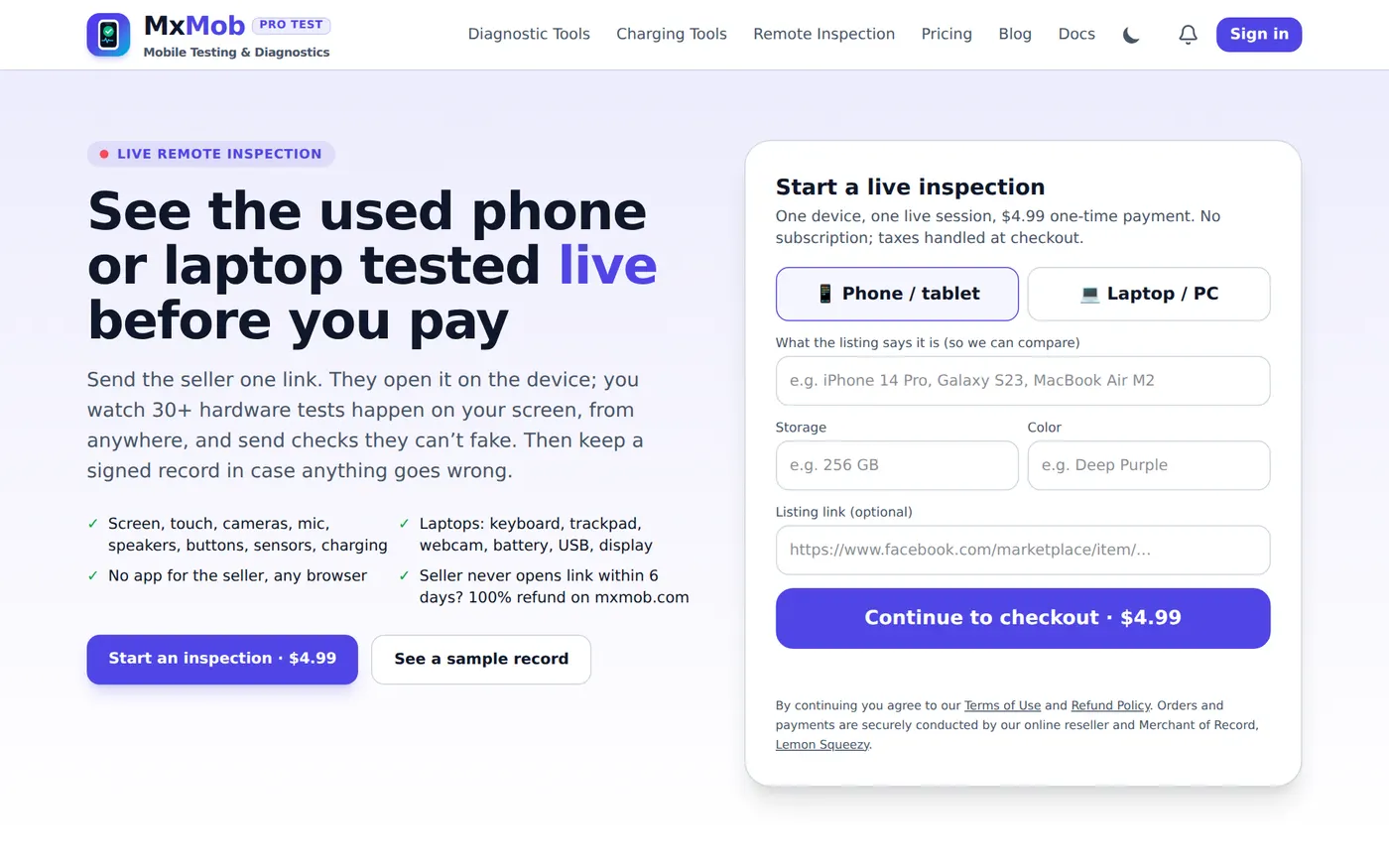
On mxmob.com/inspect, choose phone or laptop and type what the listing says it is (for example “iPhone 14 Pro, 256 GB, Deep Purple”) and, optionally, the listing link. MxMob compares the device the seller actually opens the link on with what you entered. After checkout you land on your private buyer console with a seller link and QR code you can send by text, WhatsApp, email or Marketplace chat.
Step 2: The seller opens it on the phone they’re selling
The seller sees a plain explanation of what will be shared (test results, the device model and browser, a low-resolution camera preview only during camera tests, the microphone level but never audio) and agrees before anything is sent. If they open the link on a laptop when you asked to inspect a phone, the page warns them to open it on the phone instead.
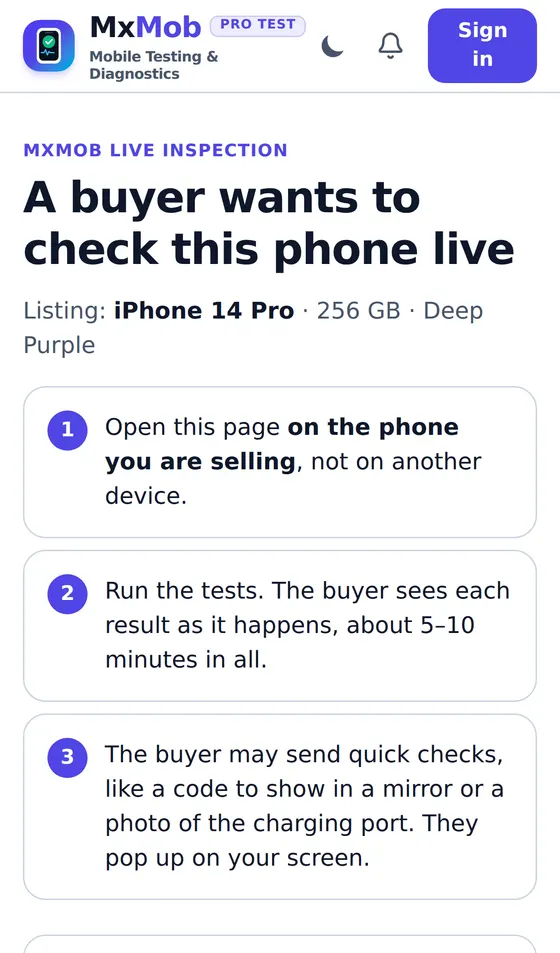
Step 3: Watch every test live and send checks they can’t fake
Your console shows each test as it runs, grouped by display, audio, camera, sensors, connectivity, power, buttons and security. Each result is labelled Measured (the browser detected it, like all 84 touch zones responding or a voice level of −21 dB) or Marked by seller (the seller pressed Pass or Fail, like how the speaker sounded), so you know which results to trust and which to double-check. Any untested part has an Ask to test button that pops up on the seller’s screen.
The panel on the right answers the question every remote buyer has: is it the device in the listing? It shows the model family, software version, browser, screen resolution and graphics chip the browser reports, and flags a mismatch, such as a “Galaxy S24 Ultra” whose screen and GPU belong to a cheaper phone.
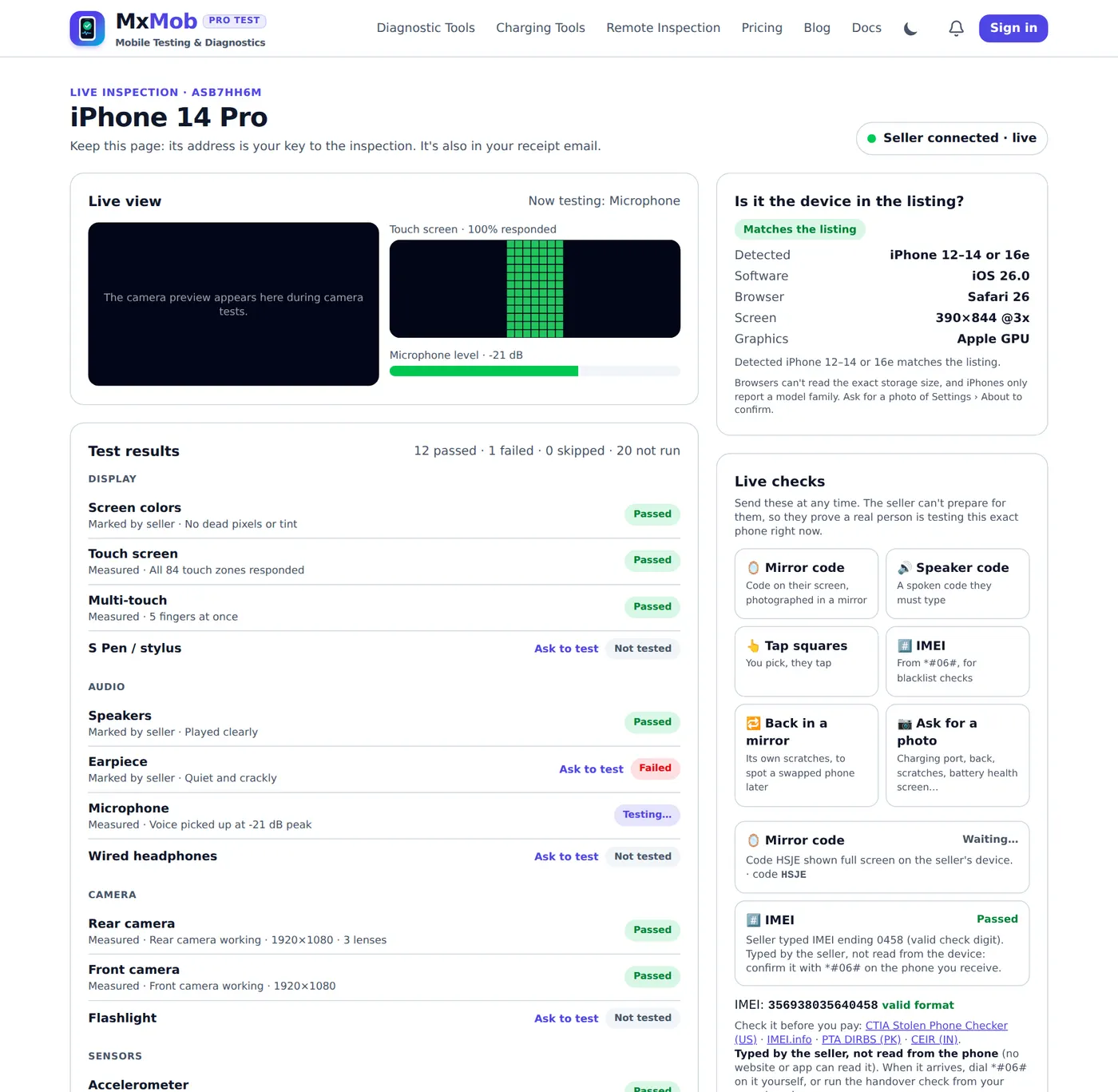
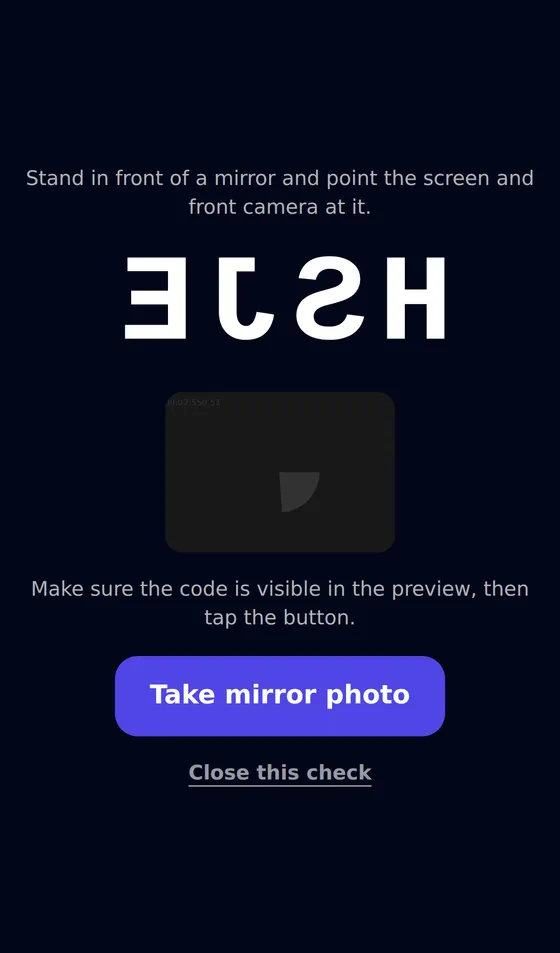
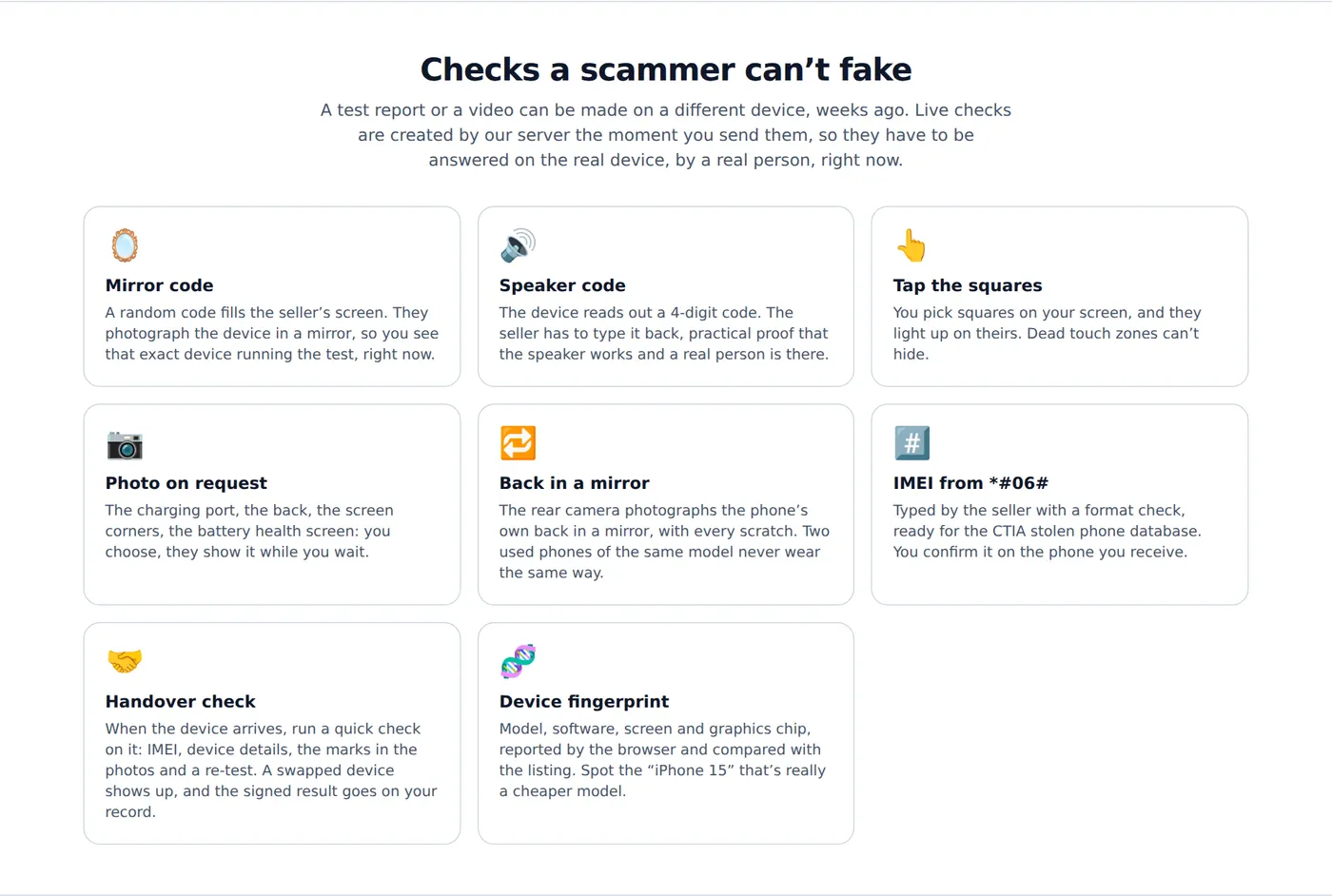
The live checks are what make it scam-resistant. A recorded video or a test report can come from a different phone, weeks ago. These checks are generated by MxMob’s server the moment you press the button, so they can only be answered on the real phone, by a real person, right now:
- Mirror code: a random code fills the seller’s screen and they photograph the phone in a mirror with its own camera.
- Speaker code: the phone reads out a 4-digit code that the seller types back, which also proves the speaker works.
- Tap the squares: you pick squares on your screen; they light up on the seller’s and must be tapped. Dead touch zones can’t hide.
- Back in a mirror: the rear camera photographs the phone’s own back, scratches and all. Two used phones of the same model never wear the same way, which matters later.
- Photo on request: the charging port, the screen corners, the Battery Health screen, Settings → About, whatever you need to see.
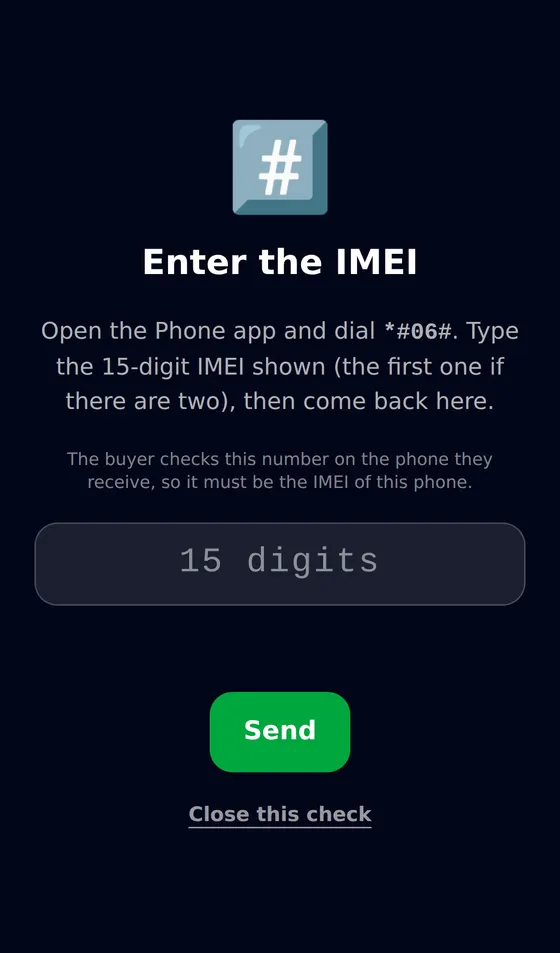
- IMEI: typed from *#06# with a check-digit test, with links to the CTIA Stolen Phone Checker.
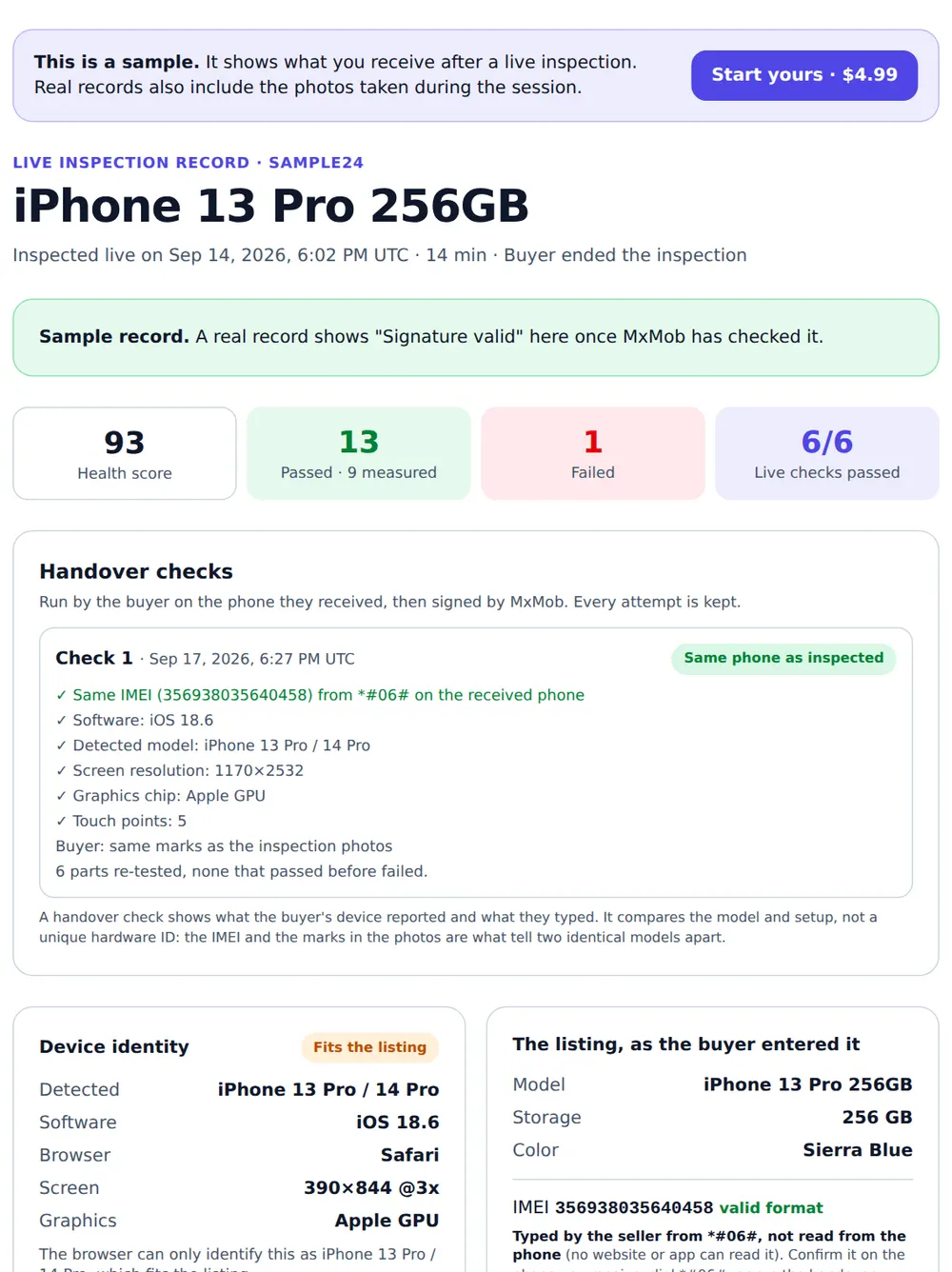
There is also a chat on both screens, so you can ask “can you show the charging port?” or negotiate on a failed part without switching apps. In the sample below, the earpiece failed and the seller offered $20 off.
Step 4: Keep a signed record, then run the handover check on delivery
When you end the inspection, MxMob creates a signed, timestamped record with every result, the live checks, the photos, the device details and the chat. It is kept for 90 days at a private link, and anyone you share the record code with can confirm it hasn’t been edited. That gives you evidence if you need to open an eBay Money Back Guarantee case, a PayPal dispute or a card chargeback.
The record also solves bait and switch. When the phone arrives, open the handover check from your record on the phone you received. It compares the IMEI you read from *#06# with the one from the inspection, compares the model, screen and graphics chip, shows you the inspection photos of the back so you can match the scratches, and re-tests the parts. The result is signed and added to your record. If the seller shipped a different phone, you have proof.
What it can’t check (and how to cover it)
We’d rather tell you the limits than have you find them out later. Browsers can’t read a phone’s exact storage size, battery cycle count, water damage or activation lock status, and no website or app can read the IMEI automatically. During the inspection, ask for a photo of Battery Health and Settings → General → About, check the IMEI on the CTIA database, and when the phone arrives confirm it resets without asking for the previous owner’s account. The How MxMob works page lists what every test measures.
Price, refunds and who it’s for
- $4.99 one-time per device, no subscription. Payments are handled by Lemon Squeezy as Merchant of Record. See pricing.
- Seller never opens the link within 6 days? Apply on mxmob.com for a 100% refund. Details are in the refund policy.
- Phones, tablets and laptops: iPhone, iPad, Samsung Galaxy, Google Pixel, OnePlus, Motorola and other Android phones, plus Windows laptops, MacBooks and Chromebooks (keyboard, trackpad, webcam, battery, USB and display).
- Sellers can offer an inspection to win a nervous buyer’s trust and sell faster.
Want to see the output before you pay? Open the sample inspection record, then start your own inspection.
Tips for each US marketplace
Facebook Marketplace
For shipped items, pay through Facebook checkout, because Purchase Protection only covers eligible purchases paid that way. Be wary of new profiles, prices far below other listings and sellers who refuse a video call or an inspection. A seller with nothing to hide usually doesn’t mind a five-minute live inspection.
eBay
eBay’s Money Back Guarantee covers items that don’t arrive or aren’t as described, but you have to show the difference. A signed inspection record, plus a handover check that fails, is much stronger evidence than “it doesn’t work for me.” Read the listing for “for parts,” “iCloud locked” or “bad IMEI.”
Swappa
Swappa checks a listing’s IMEI or serial number before it goes live, which removes many blacklisted phones. It can’t tell you the earpiece crackles or a corner of the screen doesn’t respond, so a live inspection still adds something.
OfferUp, Mercari and Craigslist
On OfferUp, shipped purchases paid in the app get the platform’s buyer protection; cash meetups don’t. On Mercari, payment is released to the seller once you rate the order, so run the handover check and the phone test before you rate. Craigslist has no buyer protection at all: meet in person in a safe place (many US police stations host exchange zones) and test everything first.
IMEI, carrier lock and Activation Lock: the checks hardware tests can’t do
A phone can pass every hardware test and still be a bad buy. Three checks matter as much as the tests:
- Blacklist status: run the IMEI through the CTIA Stolen Phone Checker. A phone still being paid off can be blacklisted later if payments stop, so ask whether it’s fully paid. Our IMEI guide covers the US, UK, Europe, India and Pakistan.
- Account locks: iCloud Activation Lock on iPhone and Factory Reset Protection on Android. The used iPhone guide explains the reset test.
- Carrier lock: a phone locked to Verizon, AT&T or T-Mobile won’t work on another network until the carrier unlocks it. Check with the SIM test or Settings → General → About → Carrier Lock on iPhone.
How to pay for a used phone safely
- Use the platform’s own checkout, a credit card or PayPal Goods and Services, which come with buyer protection.
- Avoid Zelle, Cash App, Venmo to “friends,” wire transfers, crypto and gift cards for strangers. Once sent, the money is very hard to get back.
- Never share a verification code someone texts you. That is how Google Voice and account-takeover scams work.
- Keep the conversation on the platform, and save the listing, the chat and your inspection record until well after delivery.
Selling a used phone? Prove it works
Buyers trust sellers who show evidence. Run the free phone diagnostic and create a test report link with a QR code and ready-to-paste listing text for eBay, Facebook Marketplace or Swappa. Buyers can open it on the verify report page. For a buyer who is still unsure, offer them a Live Remote Inspection: you run the tests while they watch.
Red flags checklist
- Price far below similar listings, especially for a recent iPhone or Galaxy.
- The seller won’t share the IMEI, won’t do a video call and won’t do a live inspection.
- Photos look like stock images or appear in other listings (try a reverse image search).
- “Shipping only,” but they want payment outside the platform.
- The phone is “brand new, sealed” but the seller can’t explain why it’s cheap.
- In a live inspection: the device panel doesn’t match the listing, the mirror code check fails, or touch squares and sensors “can’t be tested.”
For the full step-by-step list, keep the used phone checklist open while you shop. For laptops, there’s a used laptop checklist and the laptop diagnostic test. If you have a question this guide doesn’t answer, the MxMob FAQ covers many more.
Frequently asked questions
What is MxMob and is it free?
MxMob (mxmob.com) is a browser-based phone and laptop testing site. Every test, including the 33-point phone diagnostic, the laptop test and the charger checker, is free with no app; you only need a free account. Only Live Remote Inspection is paid: $4.99 once per device.
Is MxMob safe and legit?
Yes. The tests run in your browser, and camera, microphone, motion and location data stay on the device; nothing is installed. Paid inspections are processed by Lemon Squeezy, so MxMob never sees your card number. The privacy policy and How MxMob works page explain exactly what is and isn’t stored.
How do I test a used phone before buying it online?
If you can meet, open mxmob.com/check on the phone and run the free test. If the phone is being shipped, start a Live Remote Inspection: the seller opens your link on the phone and you watch 30+ tests and anti-scam checks live from your own screen, then keep a signed record.
Can I inspect a phone remotely before buying it?
Yes. With MxMob Live Remote Inspection the seller can be anywhere in the US or abroad. You see every result live, send checks like a mirror code and speaker code that prove it’s the same phone right now, and run a handover check when it arrives. See a sample record.
Is a FaceTime or video call enough to check a used phone?
It helps, but it measures nothing: dead touch zones, a weak microphone, a crackly earpiece and a mismatched model are easy to hide on a call, and you have no record afterwards. A live inspection measures the hardware and signs the results. The comparison table in this guide shows the differences.
How do I know the seller didn’t test a different phone?
The live checks are created by MxMob’s server at the moment you send them, so they can’t be recorded in advance. The mirror code proves that exact device is running the test, and the back-in-a-mirror photo records its scratches. When it arrives, the handover check compares the IMEI, model, screen and graphics chip with the inspection.
Does the seller need to download an app?
No. The seller opens a link in Safari on iPhone, Chrome or Samsung Internet on Android, or any modern browser on a laptop. The same is true for the free phone test.
How do I check if a used phone is stolen in the US?
Dial *#06# to get the IMEI and enter it in the free CTIA Stolen Phone Checker. Ask whether the phone is fully paid off, since financed phones can be blacklisted later. Our IMEI stolen phone check guide explains how to read the result.
How can I tell if an iPhone is fake or refurbished?
Run the benchmark to see the graphics chip, check the serial number on Apple’s Check Coverage page, and look at Settings → General → About → Parts and Service History. Our guide on spotting a fake phone has six checks a clone can’t pass.
What if the seller never opens the inspection link?
If the seller never opens the link within 6 days, you can apply on mxmob.com for a 100% full refund through Lemon Squeezy. The refund policy has the details and the online form.
Can I use Live Remote Inspection for a used laptop or MacBook?
Yes. Choose “Laptop / PC” on mxmob.com/inspect. The seller runs the keyboard, trackpad, webcam, speakers, display, battery and USB tests while you watch. Pair it with the used laptop checklist for BIOS and activation locks.
Which marketplaces does it work with?
Any of them: Facebook Marketplace, eBay, Swappa, OfferUp, Mercari, Craigslist, Reddit or a friend of a friend. You only need a way to send the seller a link. Paste the listing URL when you start so it’s saved in your record.